
Clean Dark Theme for Chrome
Overview
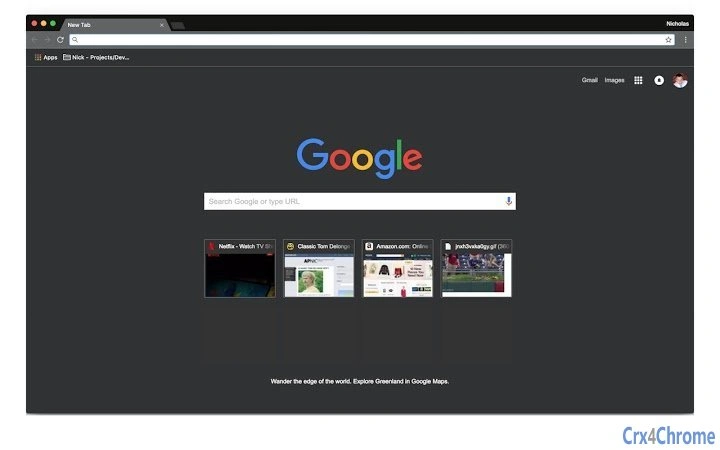
Onyx is a minimalist browser theme designed for Google Chrome, offering a clean, flat, and dark interface. Its primary purpose is to enhance the visual experience of web browsing by reducing screen glare and improving contrast. The theme is ideal for users who prefer a modern, distraction-free environment, particularly during extended browsing sessions. Target users include professionals, students, and casual internet users seeking a more comfortable and aesthetically pleasing interface.
By applying a consistent dark color scheme across Chrome’s UI elements, Onyx helps minimize eye strain, especially in low-light conditions. It is particularly beneficial for individuals who spend long hours online, such as developers, content creators, and remote workers. The theme is straightforward in function—there are no additional features or integrations beyond visual customization.
The developer did not provide additional information about the background or development philosophy. However, the simplicity of the design suggests a focus on usability and visual harmony. Onyx is intended for users who value aesthetics and comfort without compromising on performance. It serves as a lightweight solution for those who want to transform their Chrome interface with minimal effort.
Key Features & Capabilities
- Dark, Flat UI Design – A uniform dark color palette applied to Chrome’s interface elements, reducing visual clutter and enhancing readability.
- Minimalist Aesthetic – Focuses on clean lines and consistent spacing, promoting a distraction-free browsing environment.
- Universal Chrome Compatibility – Designed to work seamlessly across all Chrome versions on supported platforms.
- Lightweight Installation – Only 2.1 MB in size, ensuring minimal impact on browser performance.
- Instant Application – Applies immediately upon installation with no configuration required.
Users can apply Onyx to transform the appearance of Chrome’s toolbar, tabs, and menus in seconds. This is particularly useful for users who switch between multiple devices or work in environments with varying lighting conditions. The theme does not alter browser functionality, making it safe for all users, including those in corporate or educational settings where software restrictions may apply.
Real-world usage includes improving focus during late-night coding sessions, enhancing the visual appeal of a personal workspace, or simply refreshing the look of a frequently used browser. It is also suitable for users who prefer a consistent dark mode across their digital ecosystem.
User Interface, Workflow & Performance
The user interface of Onyx is entirely contained within Chrome’s extension settings. Once installed, the theme is applied directly through the browser’s theme manager. Navigation is intuitive, requiring no learning curve. Users can switch back to default themes at any time without data loss or system changes.
Workflow efficiency is high due to the instant application and zero configuration. The theme integrates smoothly with Chrome’s existing UI, preserving all standard navigation behaviors. There are no additional menus, pop-ups, or settings to manage, which contributes to a seamless experience.
The developer did not specify resource usage details. Performance observations are based on general software behavior patterns. As a theme, Onyx operates at a minimal level, relying on Chrome’s rendering engine. It does not consume significant CPU or RAM during regular use. Stability is expected to be high, given the nature of UI-only extensions. No known conflicts with other extensions were reported.
Compatibility & System Requirements
Onyx is compatible with Google Chrome on Windows, Mac, and Linux operating systems. The software version is 1.0.0, and the installation size is 2.1 MB. It is designed to function within the standard Chrome environment without requiring elevated permissions.
Exact system requirements were not listed. Compatibility information is limited to the supported platforms. The developer did not provide details about minimum hardware specifications, such as RAM or processor type. Users are advised to ensure their Chrome browser is up to date to maintain optimal performance and security.
Installation is straightforward and does not require administrative rights. The theme is available for download directly from the Chrome Web Store, and no external dependencies are needed.
Pros and Cons
Pros
- Instant visual transformation with no setup required
- Minimal file size reduces storage impact
- Consistent dark interface across all Chrome elements
- Safe and non-invasive—no data collection or background processes
- Available for Windows, Mac, and Linux users
Cons
- No customization options for colors or layout
- Does not include additional features beyond UI styling
- Dependent on Chrome’s update cycle for compatibility
- May not suit users who prefer light or colorful themes
- Limited to browser interface—no effect on web content
FAQ Section
Is Onyx compatible with all Chrome versions?
Onyx is designed to work with current and recent versions of Google Chrome. Compatibility may vary with older or experimental builds. Users are advised to keep Chrome updated for the best experience.
Is Onyx safe to use?
Yes, Onyx is a standard browser theme with no known security risks. It does not collect user data, access browsing history, or modify web content. It operates solely within Chrome’s UI layer.
Can I use Onyx offline?
Yes, once installed, Onyx functions without an internet connection. The theme is stored locally within the browser and does not require online access to operate.
How do I uninstall Onyx?
To remove Onyx, go to Chrome’s Settings, navigate to Extensions, find the theme, and click “Remove.” The default Chrome interface will be restored immediately.
Does Onyx require a license or payment?
No, Onyx is completely free to use. There are no subscription fees, in-app purchases, or hidden costs. It is available as a free tool for all users.
Final Thoughts + CTA
Onyx delivers a clean, flat, and dark theme that enhances the Chrome browsing experience with minimal friction. Its simplicity is its strength—offering immediate visual improvement without complexity or risk. While it lacks advanced customization or additional features, it fulfills its core purpose exceptionally well.
It is best suited for users who value aesthetics, reduced eye strain, and a distraction-free interface. Professionals, students, and anyone who spends significant time online will benefit from its calming, modern look.
For a lightweight, secure, and instantly effective way to refresh your browser, Onyx is a reliable choice. Download Onyx now.







